Function Reference: IMAGE
| Syntax | ||
| =IMAGE(source,[alt_text],[sizing],[height],[width]) | ||
| Purpose / Description | ||
| Displays an image in a cell, provided that it is stored in one of the supported file formats and the file is stored in a publicly accessible web location that doesn't require login. | ||
| Arguments | ||
| Name | Type | Description |
| source | text string | A reference to a range or nested expression that returns a valid reference, a constant or a nested expression that derives the value to be used as the source URL for the image. The text that may be entered into this argument is limited to 255 characters, so if a longer URL is required, enter that into a cell, and reference the cell. |
| [alt_text] | text string | An optional reference to a range or nested expression that returns a valid reference, a constant or a nested expression that derives the value of the alternative text. Alternative text is displayed when the mouse hovers over the image, and is used by accessibility software to describe the image to visually impaired users. We would strongly recommend that this always be provided. |
| [sizing] | number | An optional reference or nested expression that returns a valid reference, a constant text string or a nested expression that returns a number 0, 1, 2, or 3. If the value is not a number, text strings and logical values are coerced in the normal way. The value must be 0 ≤ n < 4. If the value is not an integer, the value is truncated to an integer. If the value is 0 or omitted, the image is displayed at a size that fits within the cell's dimensions, retaining its original aspect ratio. It may be zoomed or stretched from its original size. If the value is 1, the image is displayed to fill the cell, ignoring the original image's aspect ratio. The height and width will be changed to the cell's height and width. This is inappropriate for images such as logos, and those containing images of people or animals, but may work well for graphics, such as charts. If the value is 2, the image is displayed using its original height and width. If the cell height or width is less than the image's, it will appear cropped. To see the whole image the cell height and width must be at least the height and width of the image. If the value is 3, the image is displayed using the optional height and width arguments. |
| [height} | number | An optional reference to a range or nested expression that returns a valid reference, a constant or a nested expression that derives the height at which the image is to be displayed. Must only be provided if sizing is 3. If sizing is 3 and this argument is omitted, height is derived from width based on the aspect ratio of the original image. |
| [width] | number | An optional reference to a range or nested expression that returns a valid reference, a constant or a nested expression that derives the width at which the image is to be displayed. Must only be provided if sizing is 3. If sizing is 3 and this argument is omitted, height is derived from height based on the aspect ratio of the original image. |
| Return Values | ||
| Type | Specific Value | Description |
| image | If the URL is valid and does not require a login, if the user has responded to the warning about external content and enabled the linkages and the file referenced is in a supported format, then the referenced image is displayed in the cell, sized according to the sizing, and optionally height and width arguments. The image behaves like other cell values and is displayed with the horizontal and vertical alignment settings of the cell. If the cell is not If the cell is either not tall enough or wide enough to accommodate the image at the chose size, the image is cropped and only the bottom and/or left size of the image will be visible, until either the sizing argument is changed or the cell is resized. | |
| error | #VALUE! | Indicates the URL provided in source is not valid or requires a login to access the resource, or external links are disabled. |
| error | #VALUE! | The value of sizing is not a number or is not able to be coerced to a number in the range 0 ≤ sizing < 4 |
| error | #VALUE! | The value of sizing is not 3 and either height and/or width have not been omitted. Those arguments must not be provided unless sizing is 3. The value of sizing is 3 and either height and/ width have been omitted. If sizing is 3, at least one of height or width must be provided. If only one of them is provided, the other is derived from the provided one, based on the image's original aspect ratio. |
| error | Any errors referenced by arguments are returned due to propagation of error values. | |
| Notes / Comments / Advice / Warnings | ||
| Comment: | When the IMAGE function is first entered in a cell in a session, it may trigger the following security message to appear and require you to enable linking to external data, If not, the image will not be retrieved. The same warning will appear on the desktops of other users when they open the workbook, so you need to consider whether the images will be displayed in client sites with tight security options.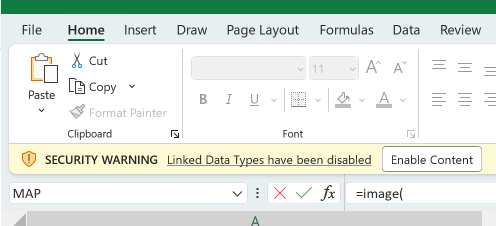 |
|
| Comment: | The image returned is not treated as a member of the shapes collection on that worksheet. It will not appear in the Shape Selection pane (Page Layout » Selection Pane). It is not accessible from the worksheet's Shapes collection in VBA or scripting code. | |
| Comment: | The image behaves like other cell values and is displayed with the horizontal and vertical alignment settings of the cell. If the cell is not If the cell is either not tall enough or wide enough to accommodate the image at the chose size, the image is cropped and only the bottom and/or left size of the image will be visible, until either the sizing argument is changed or the cell is resized. | |
| Tip: | The ENCODEURL and TEXTJOIN functions can be used to assist in building valid URLs with escape character encoding, if required. | |
| Tip: | Like other cell contents, a Hyperlink can be attached to the cell, making it a useful way to link logos to web pages, and icons to things such as documentation, disclaimers, copyright statements etc. | |
| Examples: | Open / download sample workbook that covers the basics for this function: IMAGE.xlsx | |